Instalasi Bitwarden dengan Docker
Manual Bitwarden - Docker
- Unduh prasyaratan Bitwarden versi stubbed (
docker-stub.zip) from the releases pages on GitHub.
wget https://github.com/bitwarden/server/releases/download/v1.30.1/docker-stub.zip ~/unduh
- Create a new directory named
bwdataand extract thedocker-stub.ziparchive to it. The directory structure provided matches what the./docker/docker-compose.ymlfile’s mapped volumes expect, however, you are free to change the location of these mappings on the host machine if desired.
mkdir -p ~/vols/bwdata
unzip ~/unduh/docker-stub.zip -d ~/vols/bwdata
cd ~/vols/bwdata
nano docker/docker-compose.yml
version: '3'

services:
  mssql:
    image: bitwarden/mssql:latest
    container_name: bitwarden-mssql
    restart: always
    volumes:
      - ../mssql/data:/var/opt/mssql/data
      - ../logs/mssql:/var/opt/mssql/log
      - ../mssql/backups:/etc/bitwarden/mssql/backups
    env_file:
      - mssql.env
      - ../env/uid.env
      - ../env/mssql.override.env

  web:
    image: bitwarden/web:latest
    container_name: bitwarden-web
    restart: always
    volumes:
      - ../web:/etc/bitwarden/web
    env_file:
      - global.env
      - ../env/uid.env

  attachments:
    image: bitwarden/attachments:latest
    container_name: bitwarden-attachments
    restart: always
    volumes:
      - ../core/attachments:/etc/bitwarden/core/attachments
    env_file:
      - global.env
      - ../env/uid.env
  api:
      image: bitwarden/api:latest
      container_name: bitwarden-api
      restart: always
      volumes:
        - ../core:/etc/bitwarden/core
        - ../ca-certificates:/etc/bitwarden/ca-certificates
        - ../logs/api:/etc/bitwarden/logs
      env_file:
        - global.env
        - ../env/uid.env
        - ../env/global.override.env

    identity:
      image: bitwarden/identity:latest
      container_name: bitwarden-identity
      restart: always
      volumes:
        - ../identity:/etc/bitwarden/identity
        - ../core:/etc/bitwarden/core
        - ../ca-certificates:/etc/bitwarden/ca-certificates
        - ../logs/identity:/etc/bitwarden/logs
      env_file:
        - global.env
        - ../env/uid.env
        - ../env/global.override.env

  admin:
    image: bitwarden/admin:latest
    container_name: bitwarden-admin
    restart: always
    depends_on:
      - mssql
    volumes:
      - ../core:/etc/bitwarden/core
      - ../ca-certificates:/etc/bitwarden/ca-certificates
      - ../logs/admin:/etc/bitwarden/logs
    env_file:
      - global.env
      - ../env/uid.env
      - ../env/global.override.env

  icons:
    image: bitwarden/icons:latest
    container_name: bitwarden-icons
    restart: always
    volumes:
      - ../ca-certificates:/etc/bitwarden/ca-certificates
      - ../logs/icons:/etc/bitwarden/logs

notifications:
    image: bitwarden/notifications:latest
    container_name: bitwarden-notifications
    restart: always
    volumes:
      - ../ca-certificates:/etc/bitwarden/ca-certificates
      - ../logs/notifications:/etc/bitwarden/logs
    env_file:
      - global.env
      - ../env/uid.env
      - ../env/global.override.env

  nginx:
    image: bitwarden/nginx:latest
    container_name: bitwarden-nginx
    restart: always
    depends_on:
      - web
      - admin
      - api
      - identity
    ports:
      - '80:8080'
      - '443:8443'
    volumes:
      - ../nginx:/etc/bitwarden/nginx
      - ../letsencrypt:/etc/letsencrypt
      - ../ssl:/etc/ssl
      - ../logs/nginx:/var/log/nginx
    env_file:
      - ../env/uid.env
-
Get your
installation__idandinstallation__keyfrom https://bitwarden.com/host and provide them to the application’s environment variables at./env/global.override.env.globalSettings__installation__id=c986b7c4-26f6-43db-9238-aa3f00b3ff57 globalSettings__installation__key=kIdjszKOEPzk2hoFl4DO -
Update the
baseServiceUri__*andattachment__baseUrlapplication environment variables for your hostname at./env/global.override.env.
nano ~/vols/bwdata/env/global.override.env
...
globalSettings__baseServiceUri__vault=https://brankas.proxsis.co.id
globalSettings__baseServiceUri__api=https://brankas.proxsis.co.id/api
globalSettings__baseServiceUri__identity=https://brankas.proxsis.co.id/identity
globalSettings__baseServiceUri__admin=https://brankas.proxsis.co.id/admin
globalSettings__baseServiceUri__notifications=https://brankas.proxsis.co.id/notifications
globalSettings__attachment__baseDirectory=/etc/bitwarden/core/attachments
globalSettings__attachment__baseUrl=https://brankas.proxsis.co.id/attachments
globalSettings__dataProtection__directory=/etc/bitwarden/core/aspnet-dataprotection
globalSettings__logDirectory=/etc/bitwarden/logs
globalSettings__licenseDirectory=/etc/bitwarden/core/licenses
#globalSettings__duo__aKey=RANDOM_DUO_AKEY
#globalSettings__yubico__clientId=REPLACE
#globalSettings__yubico__key=REPLACE
globalSettings__disableUserRegistration=false
adminSettings__admins=[email protected]
...
- Generate a
.pfxcertificate file for the identity container and place it in the mapped volume directory at./identity/identity.pfx.
Example:
#
openssl req -x509 -newkey rsa:4096 -sha256 -nodes -keyout ~/vols/bwdata/identity/identity.key -out ~/vols/bwdata/identity/identity.crt -subj "/CN=Bitwarden IdentityServer" -days 10950
#
openssl pkcs12 -export -out ~/vols/bwdata/identity/identity.pfx -inkey ~/vols/bwdata/identity/identity.key -in ~/vols/bwdata/identity/identity.crt -certfile ~/vols/bwdata/identity/identity.crt -passout pass:enmity-uniform-garrote-earnest-noplace
Make sure that you provide your IDENTITY_CERT_PASSWORD to the application’s environment variables at ./env/global.override.env.
...
globalSettings__identityServer__certificatePassword=enmity-uniform-garrote-earnest-noplace
...
- Copy your SSL certificate and keys to the
./ssldirectory. By default, this directory is mapped to the nginx container at/etc/ssl. The./nginx/default.confcan be adjusted to utilize these certificates as desired.
NOTE
Accessing the Bitwarden web vault and APIs via HTTPS is required. You should provide a trusted SSL certificate to the nginx container or front the installation with a proxy that provides a HTTPS endpoint to Bitwarden client applications.
Example self-signed certificate:
# buat direktori
mkdir -p ~/vols/bwdata/ssl/brankas.proxsis.co.id
# membuat private ssl
openssl req -x509 -newkey rsa:4096 -sha256 -nodes -days 365 \
  -keyout ~/vols/bwdata/ssl/brankas.proxsis.co.id/private.key \
  -out ~/vols/bwdata/ssl/brankas.proxsis.co.id/certificate.crt \
  -reqexts SAN -extensions SAN \
  -config <(cat /usr/lib/ssl/openssl.cnf <(printf '[SAN]\nsubjectAltName=DNS:brankas.proxsis.co.id\nbasicConstraints=CA:true')) \
  -subj "/C=ID/ST=DKI Jakarta/L=Jakarta/O=Proxsis Consulting/OU=Bitwarden/CN=brankas.proxsis.co.id"
-
Update the
server_name, HTTPS redirects, andContent-Security-Policyheader with your hostname at./nginx/default.conf.cp -av ~/vols/bwdata/nginx/default.conf{,.orig} sed -i -e 's/bitwarden.company.com/brankas.proxsis.co.id/g' ~/vols/bwdata/nginx/default.conf####################################################################### # WARNING: This file is generated. Do not make changes to this file. # # They will be overwritten on update. You can manage various settings # # used in this file from the ./bwdata/config.yml file for your # # installation. # ####################################################################### server { listen 8080 default_server; listen [::]:8080 default_server; server_name brankas.proxsis.co.id; return 301 https://brankas.proxsis.co.id$request_uri; } server { listen 8443 ssl http2; listen [::]:8443 ssl http2; server_name brankas.proxsis.co.id; ssl_certificate /etc/ssl/brankas.proxsis.co.id/certificate.crt; ssl_certificate_key /etc/ssl/brankas.proxsis.co.id/private.key; ssl_session_timeout 30m; ssl_session_cache shared:SSL:20m; ssl_session_tickets off; ssl_protocols TLSv1.2; ssl_ciphers "ECDHE-ECDSA-AES256-GCM-SHA384:ECDHE-RSA-AES256-GCM-SHA384:ECDHE-ECDSA-CHACHA20-POLY1305:ECDHE-RSA-CHACHA20-POLY1305:ECDHE-ECDSA-AES128-GCM-SHA256:ECDHE-RSA-AES128-GCM-SHA256:ECDHE-ECDSA-AES256-SHA384:ECDHE-RSA-AES256-SHA384:ECDHE-ECDSA-AES128-SHA256:ECDHE-RSA-AES128-SHA256"; # Enables server-side protection from BEAST attacks ssl_prefer_server_ciphers on; # OCSP Stapling --- # Fetch OCSP records from URL in ssl_certificate and cache them ssl_stapling on; ssl_stapling_verify on; # Verify chain of trust of OCSP response using Root CA and Intermediate certs #ssl_trusted_certificate /etc/ssl/brankas.proxsis.co.id/ca.crt; #resolver 8.8.8.8 8.8.4.4 208.67.222.222 208.67.220.220 valid=300s; include /etc/nginx/security-headers-ssl.conf; include /etc/nginx/security-headers.conf; location / { proxy_pass http://web:5000/; include /etc/nginx/security-headers-ssl.conf; include /etc/nginx/security-headers.conf; add_header Content-Security-Policy "default-src 'self'; style-src 'self' 'unsafe-inline'; img-src 'self' data: https://haveibeenpwned.com https://www.gravatar.com; child-src 'self' https://*.duosecurity.com; frame-src 'self' https://*.duosecurity.com; connect-src 'self' wss://brankas.proxsis.co.id https://api.pwnedpasswords.com https://twofactorauth.org; object-src 'self' blob:;"; add_header X-Frame-Options SAMEORIGIN; add_header X-Robots-Tag "noindex, nofollow"; } location = /app-id.json { proxy_pass http://web:5000/app-id.json; include /etc/nginx/security-headers-ssl.conf; include /etc/nginx/security-headers.conf; proxy_hide_header Content-Type; add_header Content-Type $fido_content_type; } location = /duo-connector.html { proxy_pass http://web:5000/duo-connector.html; } location = /u2f-connector.html { proxy_pass http://web:5000/u2f-connector.html; } location /attachments/ { proxy_pass http://attachments:5000/; } location /api/ { proxy_pass http://api:5000/; } location /identity/ { proxy_pass http://identity:5000/; } location /icons/ { proxy_pass http://icons:5000/; } location /notifications/ { proxy_pass http://notifications:5000/; } location /notifications/hub { proxy_pass http://notifications:5000/hub; proxy_set_header Upgrade $http_upgrade; proxy_set_header Connection $http_connection; } location /admin { proxy_pass http://admin:5000; include /etc/nginx/security-headers-ssl.conf; include /etc/nginx/security-headers.conf; add_header X-Frame-Options SAMEORIGIN; } } -
Generate your own random password strings for the
sqlServer__connectionString``RANDOM_DATABASE_PASSWORD,internalIdentityKeyRANDOM_IDENTITY_KEY, andduo__aKeyRANDOM_DUO_AKEYand update the variables at./env/global.override.env. Also be sure to apply the sameRANDOM_DATABASE_PASSWORDat./env/mssql.override.envnano ~/vols/bwdata/env/global.override.env... globalSettings__sqlServer__connectionString="Data Source=tcp:mssql,1433;Initial Catalog=vault;Persist Security Info=False;User ID=sa;Password=invasive-scrounge-rubicund-heck-number;MultipleActiveResultSets=False;Connect Timeout=30;Encrypt=True;TrustServerCertificate=True" globalSettings__internalIdentityKey=docket-quoit-croak-riyal-magic ...nano ~/vols/bwdata/env/mssql.override.envACCEPT_EULA=Y MSSQL_PID=Express SA_PASSWORD=invasive-scrounge-rubicund-heck-number -
Update the
app-id.jsonfile at~/vols/bwdata/web/app-id.jsonto include your hostname’s URL (ex.https://brankas.proxsis.co.id).nano ~/vols/bwdata/web/app-id.json"trustedFacets": [ { "version": { "major": 1, "minor": 0 }, "ids": [ "https://brankas.proxsis.co.id", "ios:bundle-id:com.8bit.bitwarden", "android:apk-key-hash:dUGFzUzf3lmHSLBDBIv+WaFyZMI" ] } ] } -
Configure your SMTP mail server and any other desired application settings at
./env/global.override.env.... globalSettings__mail__replyToEmail=[email protected] globalSettings__mail__smtp__host=smtp.mailgun.org globalSettings__mail__smtp__port=587 globalSettings__mail__smtp__ssl=true globalSettings__mail__smtp__username=[email protected] globalSettings__mail__smtp__password=a7c7d6a874d60fd1f254ed44eba5d09b-e566273b-bda4220a ... -
Map the desired user and group id for the Bitwarden containers to run under at
./env/uid.env.Example:
LOCAL_UID=1000
LOCAL_GID=1000
Otherwise, you can leave the
./env/uid.envfile empty and the containers will run asnobody:nobody.nano ~/vols/bwdata/env/uid.envLOCAL_UID=1000 LOCAL_GID=1000 -
Start your Bitwarden installation and access it at your configured hostname:
docker-compose -f ./docker/docker-compose.yml up -d -
Open https://brankas.proxsis.co.id/admin/ and use email address from
adminSettings__adminsto get secure link access sent to email.
Integrasi FreeIPA
| Directory | ||
| Type | Active Directory | |
| Server Hostname | ipa1.int.proxsis.co.id | |
| Server Port | 389 | |
| Root Path | dc=int,dc=proxsis,dc=co,dc=id | |
| uncheck | This server uses Active Directory | |
| uncheck | This server uses SSL (LDAPS) | |
| Username | uid=system,cn=sysaccounts,cn=etc,dc=int,dc=proxsis,dc=co,dc=id | |
| Password | ******** | |
| Account | ||
| Organization | Proxsis Global Solusi | |
| SYNC | ||
| Interval (in minutes) | 5 | |
| uncheck | Remove disabled users during sync | |
| Member Attribute | uid | |
| Creation Date Attribute | - | |
| Revision Date Attribute | - | |
| uncheck | If a user has no email address, combine a username prefix with a suffix value to form an email | |
| check | ** | |
| User Filter | (&(objectClass=*)(memberOf=cn=bitwarden,cn=groups,cn=accounts,dc=int,dc=proxsis,dc=co,dc=id)) | |
| User Path | cn=users,cn=accounts | |
| User Object Class | person | |
| User Email Attribute | ||
| check | ** | |
| Group Filter | ** | |
| Group Path | cn=groups,cn=accounts | |
| Group Object Class | **** | |
| Group Name Attribute | - |
Troubleshoting
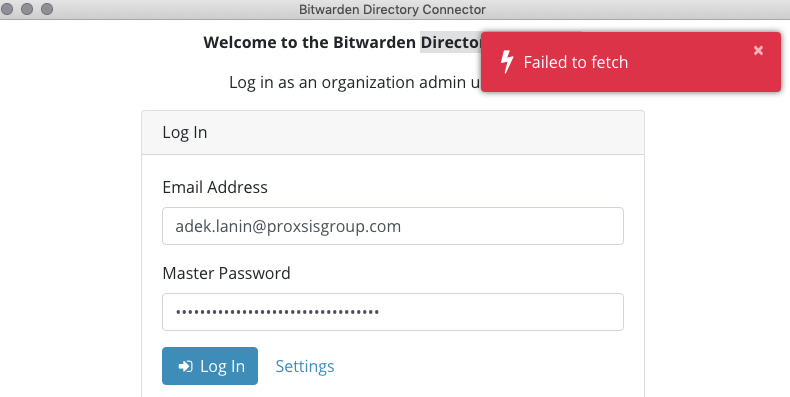
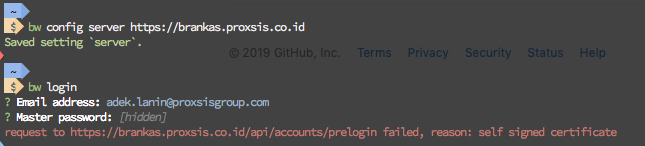
Gagal login Bitwarden Directory Connector
Rujukan
- https://help.bitwarden.com/article/import-from-1password/
- https://marketplace.digitalocean.com/apps/bitwarden
- https://help.bitwarden.com/article/install-on-premise/#manual-docker-installations
- https://help.bitwarden.com/article/directory-sync/
- https://help.bitwarden.com/article/ldap-directory/
- https://help.bitwarden.com/article/user-group-filters/#active-directory-and-other-ldap-directories
- https://help.bitwarden.com/article/admin-portal/
- https://help.bitwarden.com/article/licensing-on-premise/